
For Palo Alto Networks firewall teams
PAN-OS upgrades you can trust at 2 a.m.
Night Agent runs the pre-flight checks, backs up the config, performs the upgrade, and shows you exactly what changed — for single firewalls, HA pairs and Panorama. It runs on your machine, and your credentials never leave your network.
14-day trial · No card required · License key emailed instantly
The problem
Upgrading a firewall is the least forgiving thing you do all quarter
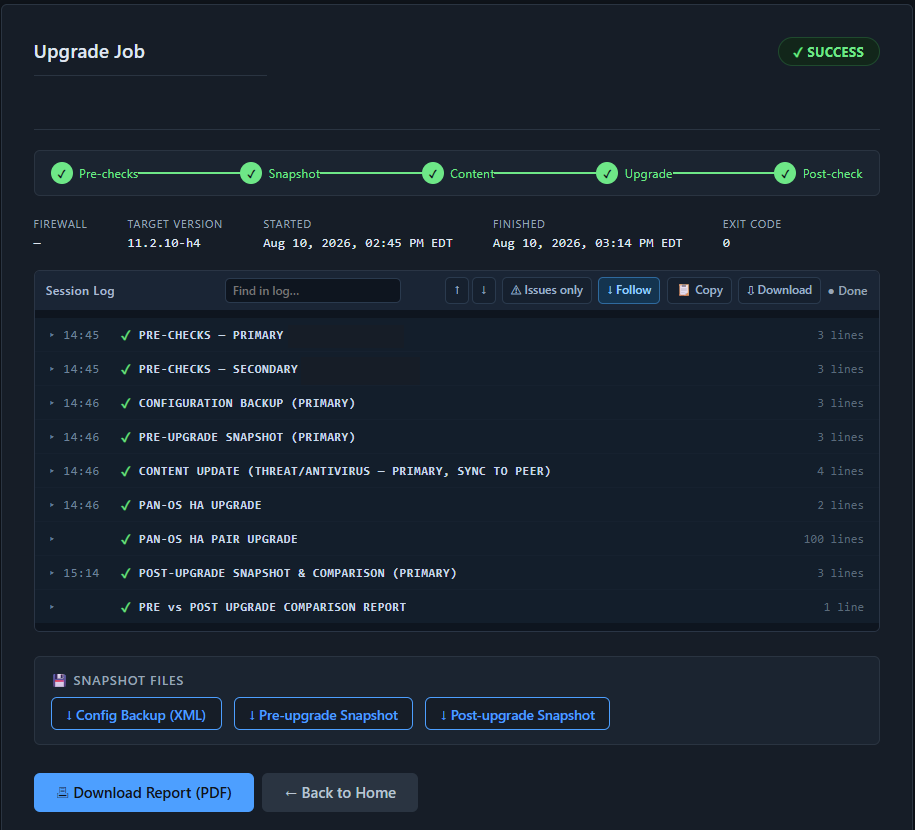
It happens at night, on a device that everything depends on, usually from a runbook someone wrote two versions ago. Miss a pre-check and you find out mid-install. Night Agent turns that into a process that checks itself, documents itself, and tells you what changed.
It checks before it touches anything
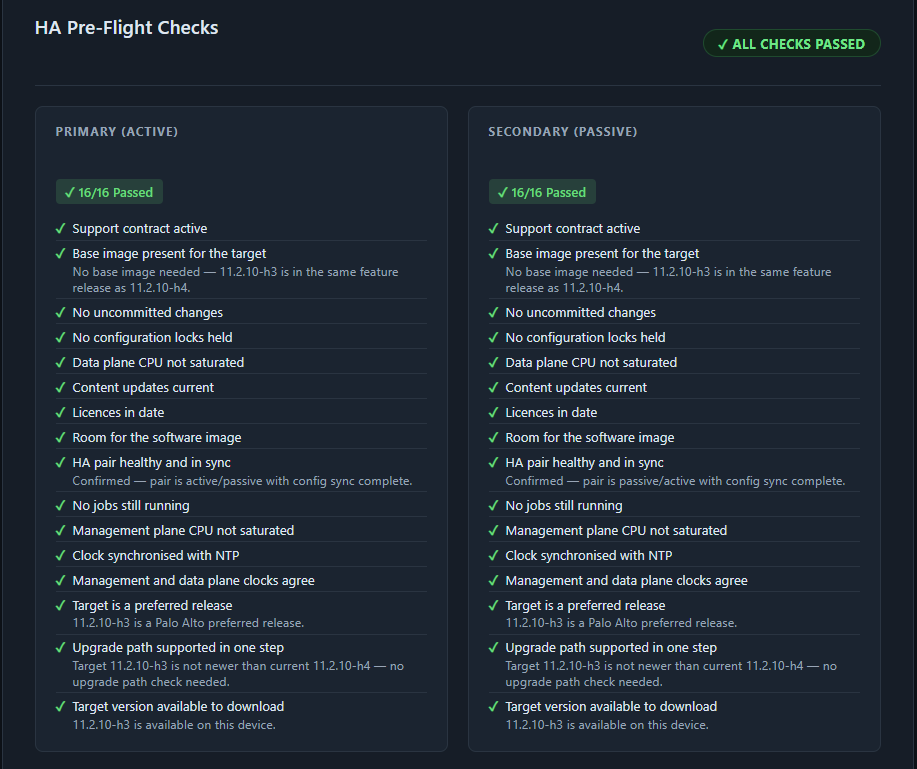
Pre-flight checks run first and stop the upgrade if the firewall isn't ready. NTP sync, candidate config, expired licenses, active jobs, config locks, CPU, disk space for the target image, and whether your upgrade path is even supported.
- Validates the upgrade path before download
- Confirms free disk space for the specific target version
- Flags known vulnerabilities in the version you're leaving
- Run checks standalone any time — no upgrade required
It handles the awkward cases
The parts that break hand-rolled scripts. HA failover ordering and preemption. Azure public-IP cutover. Panorama and its managed devices. And PAN-OS closing your API session halfway through a 30-minute install.
- Active/passive HA — one unit always carries traffic
- Azure VM-Series waits for the public IP to actually move
- Panorama, including HA pairs, with its own check set
- Session-timeout recovery across the install and reboot
It proves what happened
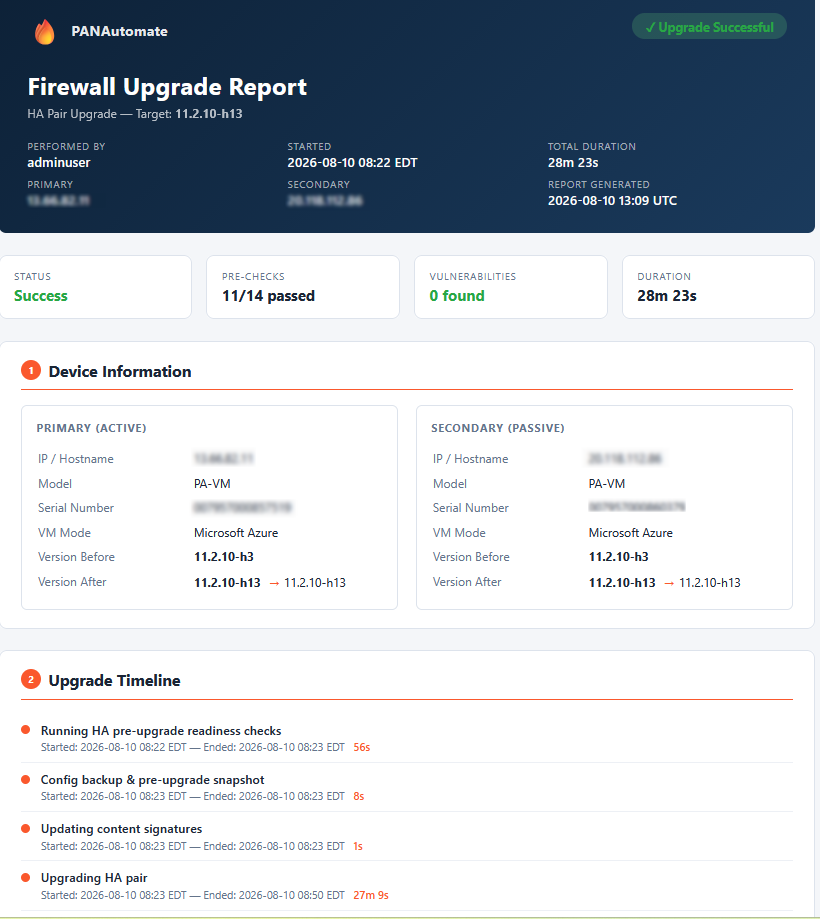
Every run captures a config backup, a pre-upgrade snapshot and a post-upgrade snapshot, then compares them. You get a report you can attach to a change ticket instead of a screenshot of a terminal.
- Running config exported before anything changes
- Before/after comparison of operational state
- Full log of every step, kept per run
- Shareable report page for change management
It runs where you are
Night Agent is not SaaS. It runs on your workstation or a jump host inside your network and talks to firewalls over the XML API. Nothing is installed on the firewall, and your configurations, snapshots and logs never leave the machine you run it on.
- No agent, no collector, no cloud dependency
- Credentials encrypted at rest, opt-in to save at all
- Passwords never written to logs, reports or config files
- Works in restricted and air-gapped environments
Coverage
Every way you actually run Palo Alto
One standalone firewall or a Panorama-managed estate — including the modes most tooling skips.
Single firewall
A standalone, non-HA firewall from start to finish.
Pre-flight checks, config backup, pre-upgrade snapshot, content update, software upgrade with reboot, then a post-upgrade snapshot and comparison.
HA pair (active/passive)
Both units, in the right order, with preemption handled.
Preemption is disabled for the duration and restored afterwards. The primary is upgraded first and must rejoin and re-sync before the secondary is touched, so one unit is always passing traffic.
Azure VM-Series HA
The same flow, plus the Azure public-IP cutover.
On Azure the public IP moves with the active unit. Night Agent verifies the firewall can authenticate to Azure, then waits for the IP re-association to finish before continuing — not just for PAN-OS failover.
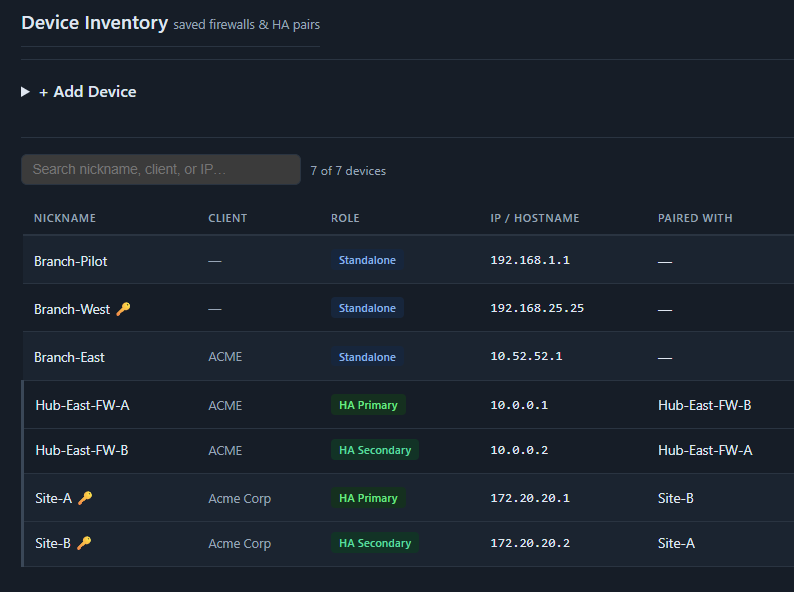
Multi-firewall batch
Many firewalls, sequential or in parallel.
Add a list of firewalls, run pre-checks across all of them, then upgrade one at a time with optional stop-on-failure, or in parallel with a concurrency limit.
Panorama
The management appliance itself, single or HA.
Panorama has no dataplane and no vsys, so it gets its own check set: managed-device connectivity, log collectors, free space on the image partition, and HA state. Managed firewalls keep passing traffic throughout.
How it works
Six steps, every time
The same sequence runs whether you're upgrading one firewall or an HA pair. Nothing is skipped because someone was in a hurry.
Pre-flight checks
Connects over the XML API and runs the check set for that device type. Anything that would make the upgrade fail — or make it unsafe — stops the run here, before a single change is made.
Config backup
Exports the running configuration and saves it with the run. If you ever need to go back, you have the exact config the device had before you started.
Pre-upgrade snapshot
Records operational state — routes, sessions, tunnels, licenses and content versions on a firewall; managed devices, collectors and disk on a Panorama. This is the baseline for the comparison.
Content update
Brings threat and antivirus signatures current before the software changes, so you're not stacking two variables in one maintenance window. Skipped for Panorama, where it doesn't apply.
Software upgrade
Downloads the image, installs it, and reboots — recovering automatically when PAN-OS drops the API session mid-install, which it does on long upgrades. For HA, this is where failover is orchestrated.
Post-upgrade snapshot and report
Waits for the device to come back, re-collects the same state, and compares it against the baseline. You end with a report showing what changed and what didn't.
Questions
The things people ask first
Is this a cloud service?
No. Night Agent installs and runs on your own machine or a jump host inside your network. It connects out to your firewalls over the XML API. No configuration, logs or credentials are sent to us — see the security page for the one licensing exception.
Does anything get installed on the firewall?
No. Everything is done through the PAN-OS XML API. There is no agent and nothing is left on the device.
Do I need to know Ansible?
No. That's the point. The alternatives are a manual CLI process or playbooks you write and maintain yourself. Night Agent is a guided interface — fill in the firewall, pick a version, and watch it run.
What if the upgrade fails halfway through?
The run stops and tells you where. You keep the config backup, the pre-upgrade snapshot and the complete log. When a step needs a human decision, the run pauses and emails you rather than guessing.
How many firewalls does a license cover?
A full license covers unlimited firewalls. Upgrades happen a few times a year, so charging per device would have punished you for managing a larger estate.
See Night Agent on your own firewalls
Enter your email and we'll send you a license key and a download link straight away. No sales call, no card.
14-day trial · No card required